TL;DR
This post documents the planning and design of my personal home lab, created to emulate enterprise networking concepts at a smaller scale. It covers goals, constrains, and architectural decisions behind the lab. The lab is designed to be isolated from my home network, flexible enough to evolve over time, and constrained by budget, space, and uptime requirements. Future posts will focus on implementation and individual projects.
Overview
Introduction
- What is this project?
- What is a home lab?
- Who is it for?
- How will it evolve? What am I trying to emulate?
- Network Architecture
- Identity & Access Management
- Segmentation
- Firewalls
- Virtual Machines
- Hypervisors
- Services Project Goals Constraints & Tradeoffs
- Preface
- Uptime
- Budget Limit
- Physical Location
- Size and Volume
- Security Exposure Planned Structure
- Compute
- Networking
- Housing
- Power
- Organization Network design
- Current Home Network
- Home Lab Design
Introduction
What is this project?
It is a personal, sandbox home lab to build my networking skills. It will allow me to try different hardware, software and fill in knowledge gaps through experience. There is no specific end; this lab is meant to grow as I do.
What is a home lab?
A home lab is a personal IT environment used for learning, testing, and exploring new ideas. It provides a system, fully customizable to fit different needs. Often, IT professionals use them to try enterprise software or work through problems in their own home.
Who is it for?
This project is primarily for me. I am passionate about learning and improving my skills and this lab gives me a way to do that. I can choose a concept that interests me and work with it, instead of only reading about it. This project is also for anyone who makes their way here. Whether it's to gain inspiration or see an approach to a shared problem, this project serves as a record of solutions and ideas discovered along the way.
How will it evolve?
Since this project won't have a designated end, its evolution will be important. The goal is to explore a wide range of topics in a home lab, instead of specializing.
What am I trying to emulate?
Enterprise networking is the art of large-scale, complex, data movement and control. This is important to mention because many of the upcoming projects will have relevance to larger scale applications. These networks are different from home networks largely due to scale and complexity. Some organizations have thousands of users, sites, locations, types of data. On the other hand, most home networks are a handful of devices focused on entertainment. Of course, this topic is broad enough to never be fully covered, so I'll break it down into the ways these concepts relate to my lab.
Network Architecture
Service location is a critical consideration for control because physical access offers the most customization. In the past, large networks were almost exclusively based on premises "on-prem". They hosted their own network infrastructure and services, looking to manage and host everything in-house. Today, many businesses have moved into cloud structures that allow for rapid expansion and lower operational costs. Both of these options can work depending on business factors. The hybrid architecture sits in between, hosting some services and outsourcing others to reduce cost and maintenance as much as possible. In the end it's a balance between cost, control and priorities.
Identity & Access Management
Unmanaged hosts are risky, therefore enterprise networks need Identity & Access Management (IAM). This allows organizations to restrict users to not only employees but the employees that need access. When data can be a company's biggest asset, access needs to be restrictive and deliberate. Keeping to the networking applications of IAM, servers are the backbone. An Authentication, Authorization, and Accounting (AAA) server can be put in place, enforcing who and what should have access when it's requested.
Segmentation
Large networks produce traffic that can become noisy very quickly. Noise is when the data moving across a network becomes too dense to work with. It disrupts security, logging, and management. Segmentation is a networking technique that fixes this problem. It does this by channeling data into Virtual Local Area Networks (VLANs) which contain traffic to similar groups. This is done to make it harder for an attacker to traverse as well as easier to manage. I think of segmentation as TSA through the airport; if everyone was able to move through a large opening to their gate, there would be no security or identification. With TSA it's very different, traffic is isolated to their respective airline, filtered through identity and luggage checks and traveler interaction is limited. Segmentation is implemented to solve the same problems. It is important to mention that segmentation is considered "logical", but in the case of the most sensitive data, physical separation may be needed. Overall, segmentation is vital to enterprise networks for its ability to improve management, security and reduce noise.
Firewalls
With all of this traffic organized there must be a way to control it. Firewalls are network devices that allow this organized data to be restricted. Sometimes, someone from the Sales team may need to communicate to a device within the Marketing team. In these cases a firewall decides whether communication is acceptable on the network. System administrators implement rules that allow or block based on conditions. Using these rules, limits can be set on how data flows. This could be as abstract as blocking a location that isn't relevant to the organization. Or as granular as block IP 14.201.176.12 at 9:00pm - 6:00am, from using port 21, on host A. This is similar to filters in a drinking water system: fiber, membrane, and chemical, making sure the water is safe to drink (to learn more about water filtering press here). Firewalls work in a similar way purifying traffic to only what is essential to the organization. This enables security, risk reduction, and most importantly operations to run smoothly.
Virtual Machines
We have discussed traffic and identity but where are necessary services hosted? Often, in enterprise environments they live on a few hosts but not in the typical way. Typically, services are run -- Hardware -> Operating System (OS) -> Service. However, when many services are required, having a large number of devices becomes cumbersome. Virtualization is a solution that many choose to employ to fix this. Resources are pooled into one powerful device that holds multiple computer instances on it. These computer instances can run side by side and are known as Virtual Machines (VMs). This allows organizations to have fewer devices which frees up space. Since multiple VMs are on one host managing them becomes easier, often through just one management interface. Virtualization is vital in not only enterprise environments, but my home lab as well.
Hypervisors
When considering virtualization, hypervisors are the foundation for making it work; they are the software that allows multiple OSs on one device. A type 1 hypervisor runs on hardware itself similar to how operating systems work. The virtual machines run here are the main priority of this operating system. This means it can actively adjust resources based on the VMs' needs. Type 2 runs as an application on an operating system instead of replacing it. Due to only running as an application the operating system considers the hypervisor as a lesser priority. Both types have their uses, however for enterprise and home lab, type one will be more important.
Services
There are many services that can be run on this infrastructure. However it will make more sense to detail them as they come up in lab use! This wraps up the enterprise networking section, next we move to..
Project Goals
The specific goals I have for this project are,
- Develop a technical understanding of new concepts through implementing them
- Build confidence and efficiency when learning and applying new technologies
- Design solutions that solve problems long term and can stand up to change
- Implement services that measurably improve network efficiency
- Create a record of challenges and successes for others to draw from
These goals help to guide the choices and their tradeoffs discussed in the sections that follow.
Constraints & Tradeoffs
Preface
Having to manage challenges is beneficial. A home lab without compromise would stunt the growth of problem-solving skills.
Uptime
The lab cannot negatively impact uptime for other users. Many other people in my household conduct their work on our home internet. Therefore, I have decided to isolate my network so no one else is affected by the changes made. The tradeoff here is losing edge routing, since I can't make significant changes to the external devices. This tradeoff is acceptable because the firewall in the lab can act as an edge router without directly separating ISP from lab.
Budget Limit
Spending for this project must currently remain below $800. Overcoming this means choosing between cost for now and cost for later. So the balance is not purchasing something that needs immediate replacement or is overkill. The home lab will still be complete and meet my goals even with financial constraints.
Physical Location
The Modem and Router are separated from my designated home lab location by a floor and is unable to be relocated. The powerline ethernet used presents some challenges, including limited VLAN tagging, speed limitations and reliability concerns. These limitations don't pose an immediate threat and can be improved later.
Size And Volume
Size must remain inside a DeskPi mini rack and sound must be as low volume as possible. These size and noise requirements do sacrifice peak performance and expansion. Within the limited size virtualization is available for multiple services and limited enterprise tooling.
Security Exposure
Nothing can compromise security, only improve it. So hosting services fixed to my IP publicly is not an option and any remote connectivity must remain secure. VPNs and internal services satisfy this because it doesn't increase attack surface significantly. Internal services work as well because they can have functionality inside the network without exposing ports.
Planned Structure
This section defines the roles and requirements of each component given my constraints mentioned above.
Compute
Requirements
Compute will act as the brains of this home lab, enabling everything else. I was looking for a few things when choosing what can fill this requirement: size, speed, expandability, and cost. Due to my constraints, I needed a small form factor so it could reasonably fit inside the rack. Speed was important, not only for CPU processing power but also for memory. Expandability is an interesting priority since I had a limited form factor. Instead of wanting space for a GPU or multiple hard drives, the goal was 64 GB of memory. Of course, everything needed to fit within my budget as well.
Implementation
The purpose of these requirements was to fit within my constraints while still allowing me to run a hypervisor with multiple VMs. I chose Proxmox for this for a couple of reasons including space, expandability, management, and efficiency. Proxmox holds multiple VMs on one host, so I can save valuable space in the rack. It also allows for future clustering if I plan on expanding my compute power. Instead of managing separate devices through different displays, this approach allows me to use one consolidated web UI. Finally, pooling resources will always be more efficient than separating them from each other.
Networking
If the mini PC will act as the brains of my home lab, networking will be what brings it together. Here we will detail switches, cabling, and a router + firewall.
Switches
Switches allow for communication within a network because they connect devices together. This is important for the home lab since we need devices to be connected to each other as well as the internet. Priorities in choosing a switch included a few things: VLAN tagging ability, 8+ ports, 2.5g speed, and power over ethernet (PoE). Each of these requirements is important, so let's walk through them. VLAN capabilities are important for my future plans to gain experience with segmentation; although it is quite difficult to get management functionality in a small form factor. 8+ ports was chosen because it allows for plenty of expansion in the future. 2.5g speeds are currently overkill, however later on it will become useful when powerline ethernet is replaced. Finally, PoE is currently needed for a Pi Zero I have but will become more beneficial later especially for reducing cables. A switch that fits these needs will be minor overkill for my initial setup, but it will allow for growth without another major investment.
Cabling
This section briefly describes the cable type that will occupy most of my lab. I have chosen Cat 6 because of its speed, size, and price. Since I don't plan on running any long lines and will likely be limited to 2.5g for the foreseeable future, it should work perfectly. The cables are thin and manageable so I won't have any issues when working with tight spaces. It also comes in at a reasonable price ($12 for a 10 pack of 1ft length). Overall Cat 6 was an easy choice compared to underpowered or overkill cable types available. RJ45 was chosen for the primary connector because it's inexpensive, widely available, and compatible with most network devices.
Router and Firewall
As stated earlier, this home lab will be separate from the rest of my home network. To achieve this I was considering a VM router / firewall or a physical device. The choice has not been made completely yet so I will list pros / cons of both.
First, a virtualized option allows for easier management, due to it being located on Proxmox. It is also much easier to replace it with another software since it's just a VM. Its upsides lend to it's downsides, which come from the fact it isn't an individual device.
A physical solution would also provide both benefits and negatives. The most valuable part of having a physical device is realism; in an enterprise situation a device as important as a firewall would undoubtedly be physical. The challenges associated are again what makes it beneficial, a dedicated device means more specific constraints to work within.
Although I haven't made a decision yet, I am leaning towards a physical device.
Housing
What contains the lab is very important when considering the space requirements. I have decided to go with the DeskPi RackMate T1-Plus 8U for its form factor. The specific model I have chosen measures 10.23" by 8.34" by 16.45" (L x W x H, inside) offering plenty of room without being too large. The 8U of vertical space is more than the lab will necessitate, making sure expansion won't be an issue later. Each physical device will comfortably fit inside, especially with 3D printed organization.
Power
Within networks, insufficient power management can undermine significant investments. If a building loses power and there isn't an Uninterruptible Power Supply (UPS), critical systems are susceptible to data corruption. Although it is vital to prepare for power loss, the lab will not initially have one due to cost. As the lab grows and more important data is stored a UPS will be added.
Organization
Organization is often an under appreciated section of network environments. Improper routing and cable management are very hard to overcome after implementation. For this lab, I plan on using a patch panel as well as multiple types of cable ties. Both of these solutions allow for organized cables and easier future adjustment. Although this section is short, organization will play a pivotal role in the home lab's construction.
Network Design
Network design aims to display the logical goals of the home lab. When considering changes it is important to mention the current state of the network before detailing changes. Diagrams have been added to offer context alongside the text.
Current Home Network
My current home network is set up as many are, with routers offering most of the services.
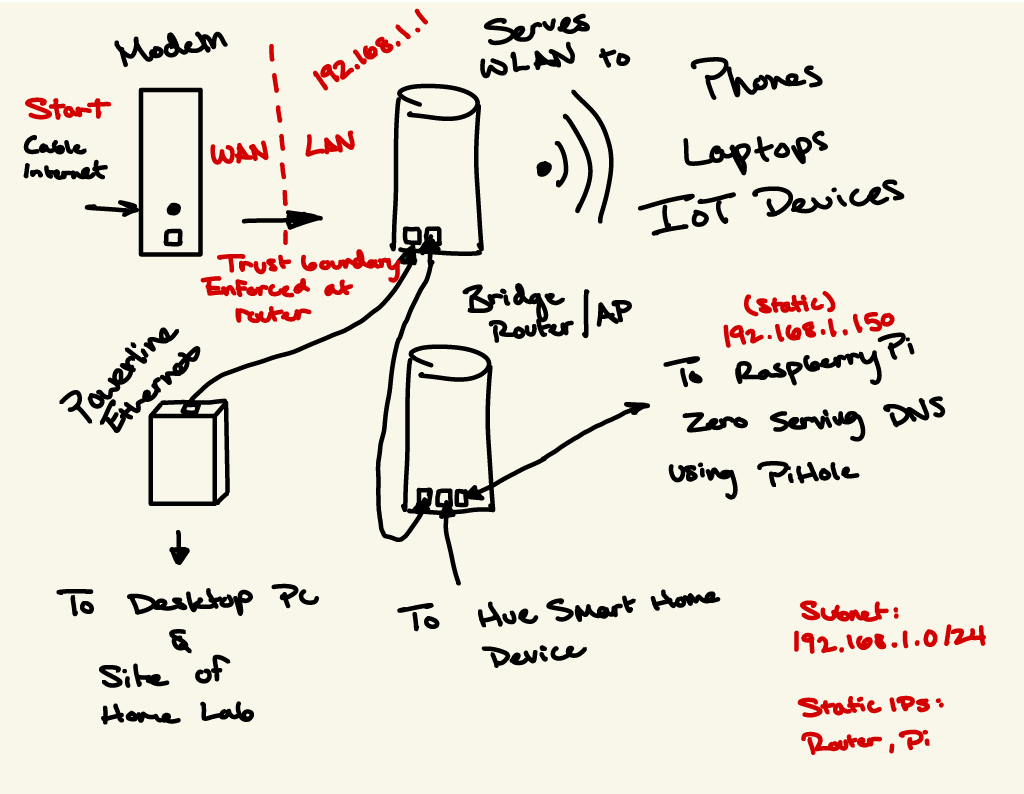
Internet access comes in from my ISP through coaxial cable. Then it goes to the modem where it is passed to my router. The router has the job of serving Wi-Fi to most devices in my home. It also uses Dynamic Host Configuration Protocol (DHCP) to serve IP addresses to all of the devices on the network. Of course, it is responsible for all the routing as well. Next to note on the network is a second router set to bridge mode; this is done to extend Wi-Fi range in the house. Due to limited port space on the original router, the bridge has a few services running off of it. First it has Pi-hole DNS that offers network-wide ad blocking, and a Philips Hue smart home device.
As shown, data makes its way to the home lab site through powerline ethernet. Powerline has its own problems, but for now it will remain even as the home lab grows. The powerline adapter gets plugged into an outlet as well as an ethernet cable. Then it communicates with the other adapter to create a connection, where data can travel.
Home Lab Design
This section will visualize network architecture after home lab implementation.
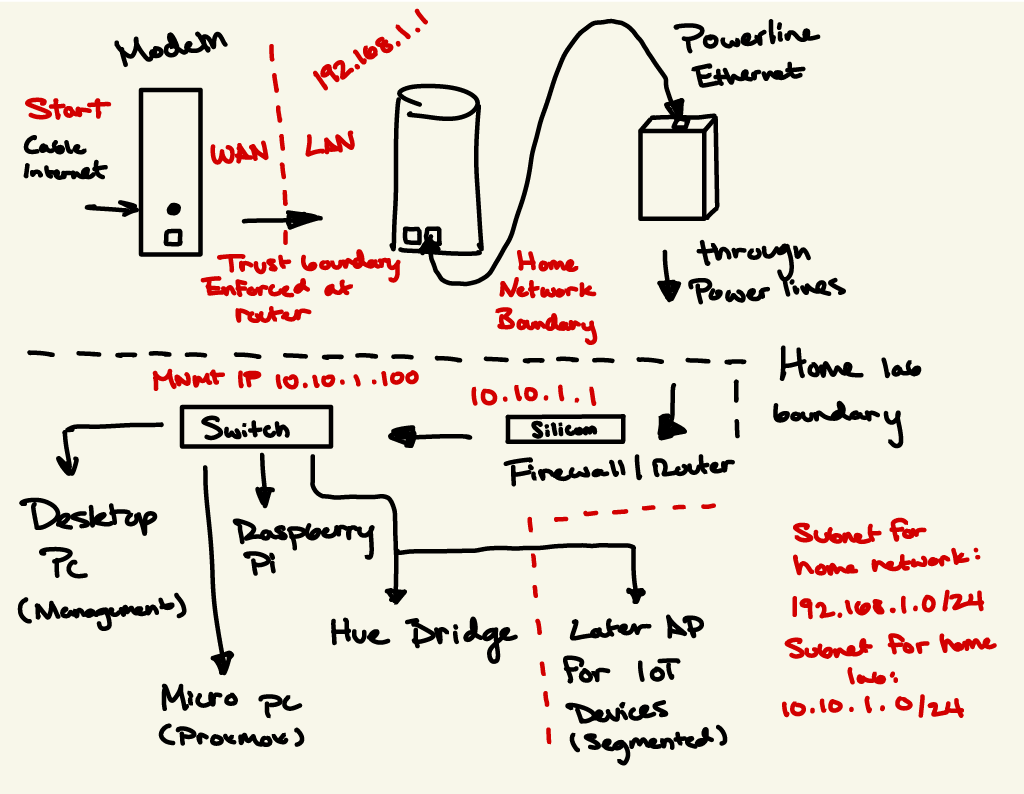
This diagram has become more complicated, but I'll break it down. Information still comes in from my ISP and travels no differently up until going through powerline. Then from there data is first channeled through a firewall. This then changes the subnet from 192.168.1.0/24 to 10.10.1.0/24. Then from there it is brought to my switch, which supplies connectivity to the rest of the devices.
Instead of there being one trust boundary from ISP to home network, there is a second entering my lab. This architecture allows me to do a few things: Separate my home lab from the rest of the network, give me full control over my subnet, and explore a broad range of projects over time.
These diagrams are subject to change, and finalizations will be detailed in a later post discussing implementation.