Why a Firewall at All?
For my home lab, a firewall is critical for a couple of reasons. The primary driver is separation. My lab needs to operate independently from my family's network so I can experiment freely without affecting devices that others rely on every day for work. If I cannot bring services up and down, test configurations, or intentionally break things without introducing risk, the lab loses significant value.
Beyond isolation, a firewall offers structure. A flat network certainly connects. However, it lacks meaningful boundaries. By incorporating segmentation, rules, and zones, I can create a layered architecture instead of a single shared domain.
The firewall enables me to act as a separate network, although I am still inside my home network. It gives freedom without a completely separate internet connection, giving me freedom without unnecessary complexity.
Attempt #1: Silicom Appliance
Most opportunities for success begin with failure, at least in my experience, and this was one of them.
When purchasing my compute node, the seller included a Silicom ATT-V150 that had originally been created for AT&T. It was a great deal overall, other than the fact that I needed to purchase an uncommon power cable to use it.
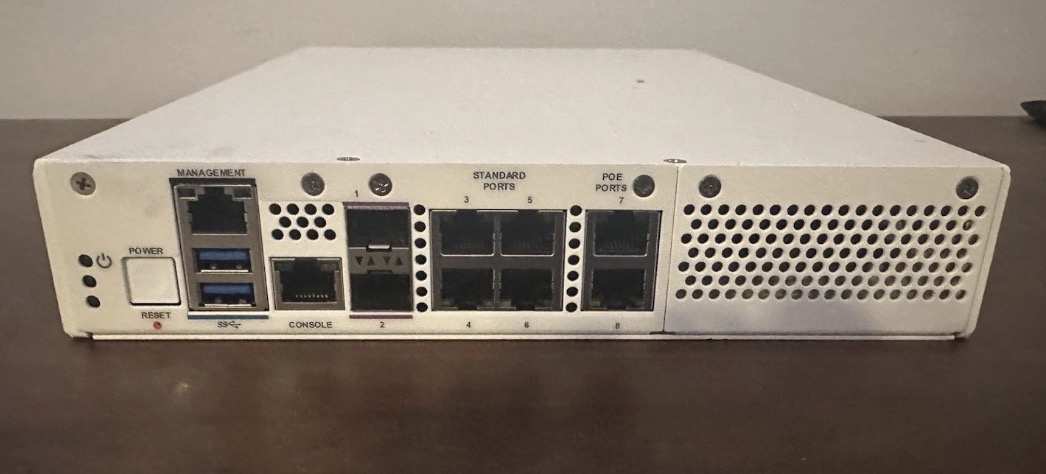
At first glance, it looked promising. The front panel had multiple ports, including two SFP+ cages, and the hardware itself was solid for a small firewall: 4 cores, 8 GB of memory, and 64 GB of storage. For OPNsense, that would be more than enough.
After installing OPNsense (FreeBSD-based), I discovered that only the management port and the two SFP+ interfaces were recognized by the operating system. The other ports were either disabled or hidden behind AT&T's original design. It was made to have specific routing paths for the carrier, and was not intended to be used as a general purpose multi-interface firewall.
At that point, I decided to work around the limitation rather than abandon it.
The plan was simple on paper:
- Use the 1GbE management RJ45 port as the WAN uplink
- Use one SFP+ cage as LAN
- Trunk traffic into my switch
Since I did not own any RJ45 SFP+ modules, I chose to purchase fiber instead. I had worked with fiber during an internship, and it solved my problem at a lower cost than buying copper modules. Structurally, it made sense.
In practice, however, the plan fell apart.
Although OPNsense could see the Intel X553 interfaces, the internal backplane routing the appliance had, stopped them from operating as independent, standard NICs. The device had been designed to suit AT&T's specific need, where certain interfaces were logically restricted or mapped in ways that weren't exposed to a generic FreeBSD install. As a result, I couldn't pass traffic cleanly between WAN and LAN the way a traditional firewall expects to.
In short, the hardware had the capability but I made the wrong compatibility assumptions.
What the Failure Taught Me
In the end, the appliance could function as a basic Linux host, but it could not be the flexible, multi-interface firewall my lab needed.
While the experience was frustrating and cost me several hours of testing and reinstallation, it gave me something more valuable than a working firewall: clarity.
I learned that not all (enterprise) hardware is modular in the way it may appear. Some systems are designed with a very narrow original purpose, attached to a carrier or deployment structure. When removed from their setting, flexibility can vanish.
More importantly, I learned how to:
- Research hardware past surface specs
- Validate interface access at the OS level
- Improve my troubleshooting process, especially with unfamiliar systems
- Create creative workarounds while remaining able to pivot
Specificity is what makes a system useful in its intended role. In my case, that same specificity made the AT&T appliance a lesson instead of my solution.
Rethinking the Architecture
After the first attempt failed, I had to rethink my approach to the lab's firewall completely.
Technically, I had easier options available. I could spin up an OPNsense VM inside Proxmox, or find a cheap mini PC and repurpose it as a firewall. Both approaches would work at a basic level. I've seen many home labs that operate this way successfully.
However, I wanted my firewall to be a dedicated, standalone device.
Virtualizing the firewall would create shared trust boundaries between WAN, LAN, and the hypervisor it ran on. While this setup can be secure when implemented carefully, it creates a few extra dependencies: if the hypervisor fails, the entire network fails. In a similar way, merging LAN and WAN into one physical interface using VLANs would work, but it removes a layer of physical separation that I would prefer to maintain.
Choosing a dedicated device came with tradeoffs. My requirements became stricter. I could no longer grab the cheapest, small form factor (SFF) PC and be done. The firewall needed to meet specific requirements.
At a minimum I wanted:
- At least two physical interfaces, ideally more for later flexibility
- Support for SFP+ / 10GbE expansion
- Reliable VPN performance
- Lower noise levels
- Plenty of memory to support services like Suricata in the future
Once I ruled out the cheapest option of virtualization, it became clearer. If I was going to invest in a firewall, it needed to be a long term solution instead of a temporary patch.
Attempt #2: The Right Fit
With those criteria in mind, I began scanning used marketplaces for a device that met my requirements as well as my budget. After a few weeks of watching listings, I found the right candidate.
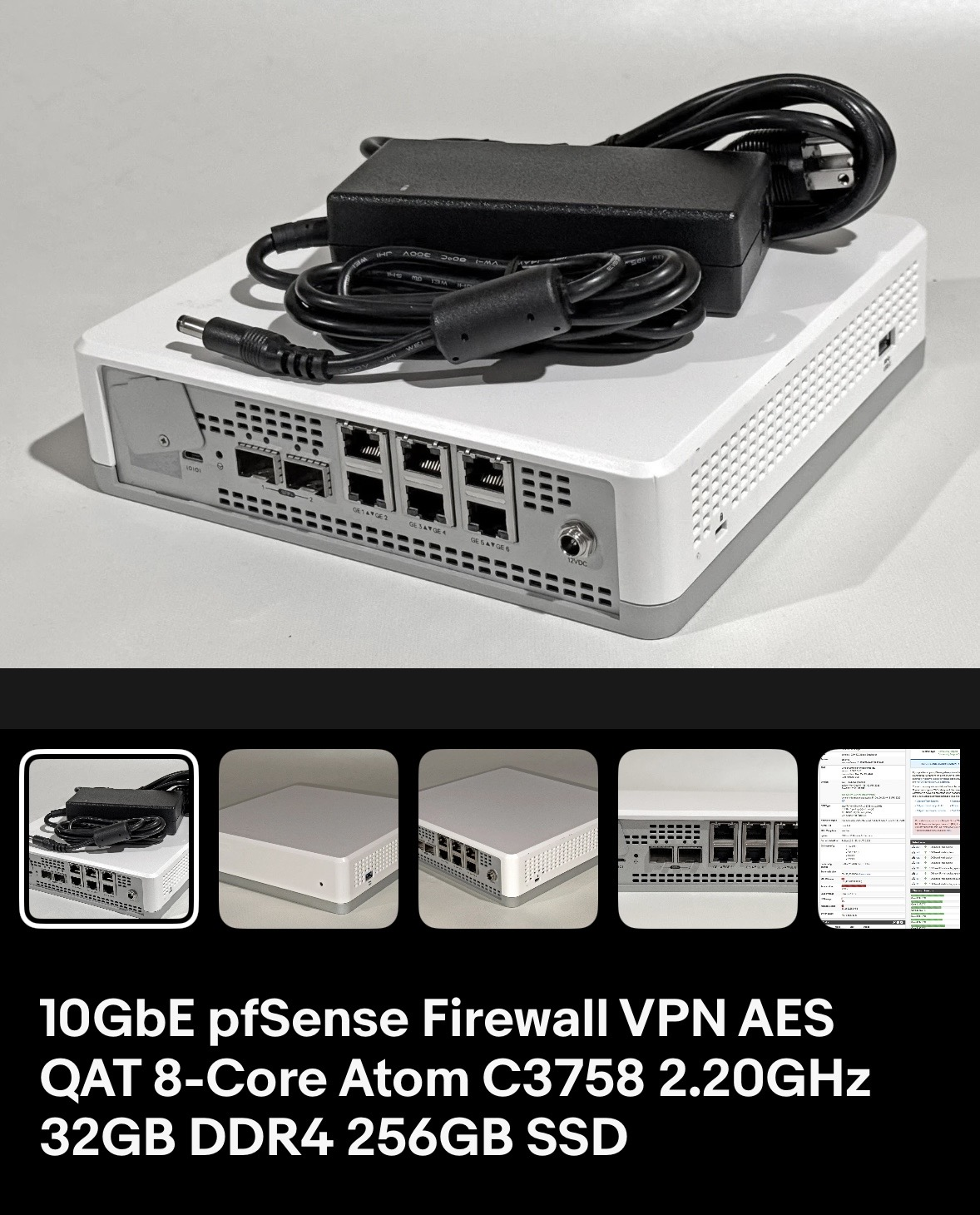
Enter, the VMware Edge 640, equipped with:
- Intel NICs (I350 + X553)
- 32GB of ECC RAM
- Intel QuickAssist Technology (QAT)
- Dual SFP+ 10GbE ports
- A compact case suitable for a mini rack
At $160, it was far more capable than I had originally expected to find.
A Note on Intel QAT
This was my first device supporting Intel QuickAssist Technology. QAT is a hardware acceleration engine designed to offload certain cryptographic operations from the CPU cores. Tasks such as symmetric encryption (AES), asymmetric encryption, and hashing can be handled more efficiently, reducing CPU load and improving throughput on VPN-heavy work.
In practice, QAT only benefits certain cryptographic workloads. It does not accelerate everything, and it is not mandatory for every firewall. However, in my lab where VPN termination and encrypted traffic are part of the design, it offers extra headroom and efficiency.
It was not the deciding factor in my purchase, but it adds credibility to the fact that this platform was made for similar use cases to mine.
Implementation Overview
My final topology is designed to be simple, but intentional.
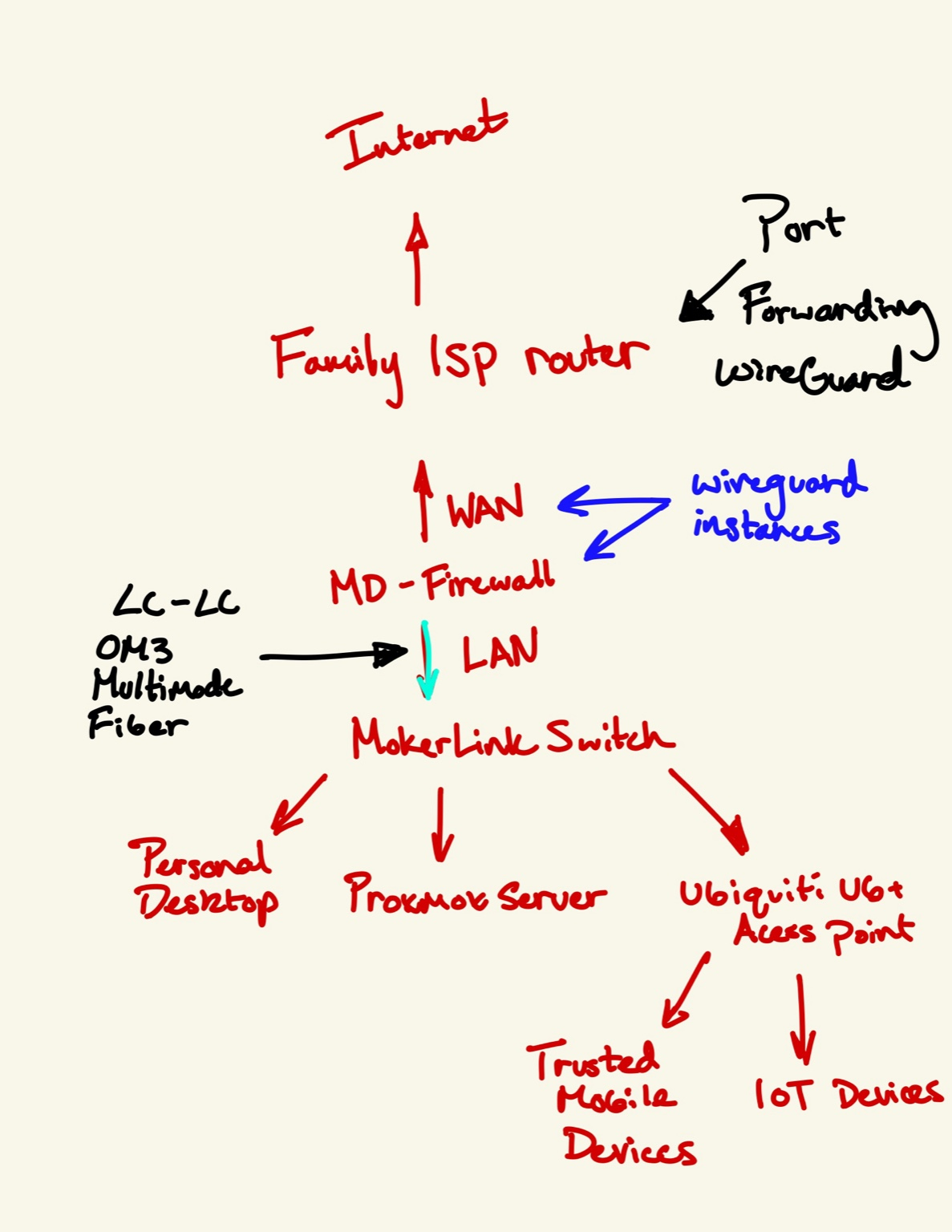
The internet connection starts through my family's ISP router. Instead of using my firewall to replace it, I treat it as an upstream device and use port forwarding rules to expose WireGuard to my lab firewall. This allows me to enable remote access without any disruption.
From there,
- The WAN interface on my firewall connects to the ISP router through 1GbE RJ45
- The LAN interface uses SFP+ over OM3 fiber
- This 10GbE trunk connects directly to my MokerLink switch
The switch then feeds connectivity to:
- My Proxmox server
- My personal desktop
- A Ubiquiti U6+ access point
The access point further connects:
- Trusted mobile devices
- IoT devices (future VLAN segmentation)
This layout works for several reasons:
WAN simplicity
Due to one entrance into the firewall, it places all ingress traffic at a choke point that can be completely managed instead of having multiple entrances.
LAN 10GbE
It is able to run at 10Gb, so it is fast and flexible for different traffic loads.
Firewall acts as only entrance
A true edge device was important because there is no meaningful difference between it acting as the actual edge device versus sitting behind my family's home network.
WireGuard terminates at firewall
VPN traffic ends at the entrance of the network so it is secure getting there and regulated from there on out.
As a result, separation is achieved, security is enforced, and future expansion comes naturally.
Semi-Unexpected Project: Noise & Heat
Although the firewall itself met every technical requirement, it came with one significant drawback.
The seller had noted that, when using FreeBSD operating systems, the fans run at full speed at all times because fan controls aren't exposed. When testing, this meant the factory high-RPM server fans ran at 100% constantly.
In a rack closet, this would not matter. On a desk in a bedroom, it certainly did.
After living with the noise level for a few days, I determined it was slightly too loud to be acceptable long term.
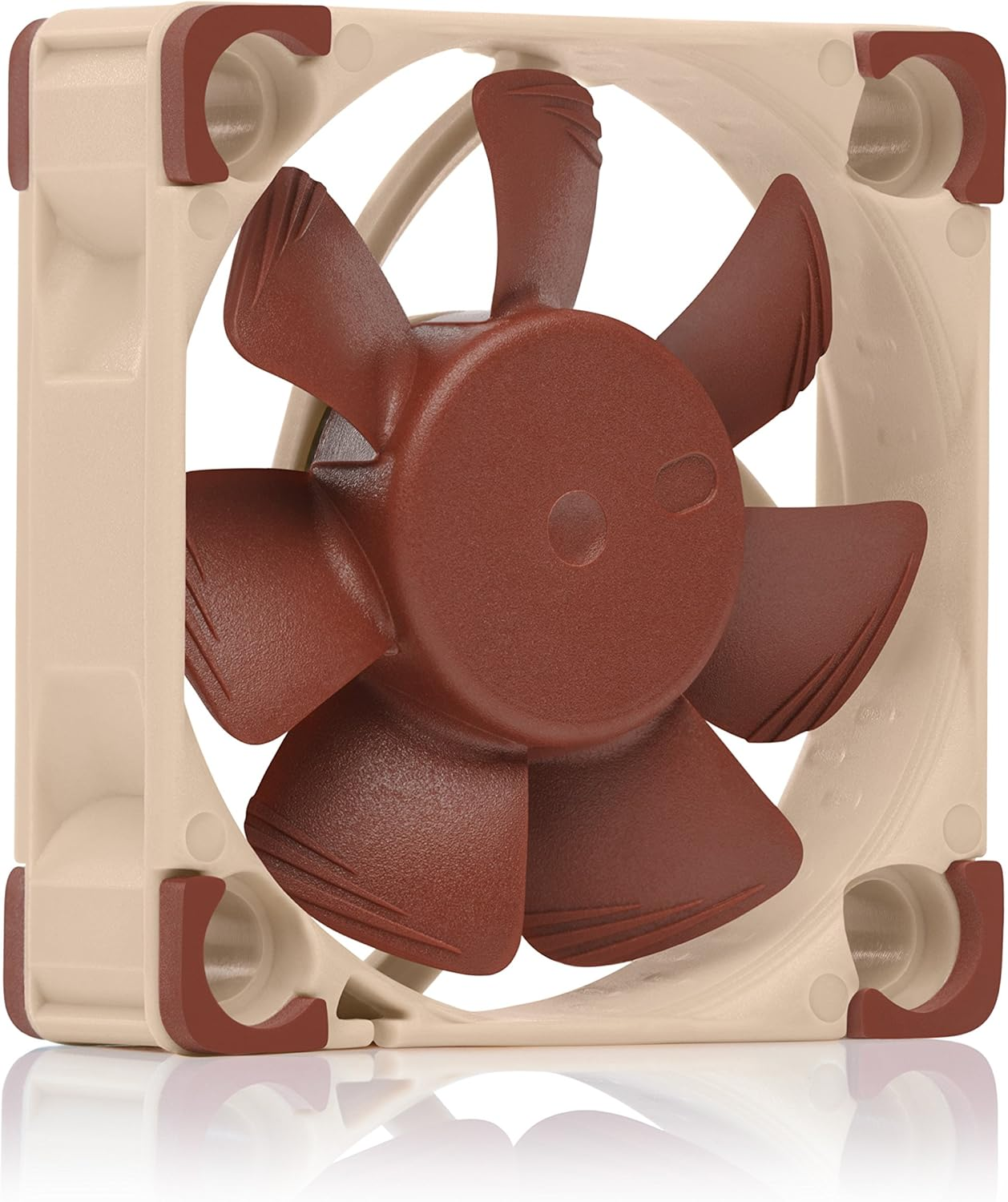
I purchased two 40x40x10 Noctua replacement fans. With this upgrade I expected a similar experience to every other fan change I've done, plug and play. When powering on the appliance, the new fans would spin briefly and then stop.
Viewing the console during boot revealed that the system was failing its fan detection test. The original server fans likely reported a certain RPM that the replacement fans were not fulfilling due to their intentionally lower speed designed to reduce noise. As a result, the firewall would shut down and refuse to acknowledge them.
What followed wasn't pretty.
After testing voltage, experimenting with headers, and attempting numerous configurations, it became clear that the fan controller logic was more restrictive than I had anticipated. Rather than continuing to fight the firmware, I chose a simpler solution; I tapped power directly from another location on the board and bypassed the fan headers entirely. The replacement fans now run continuously at a lower, quieter RPM.
The result is a significant reduction in noise while keeping stable thermals.
On Troubleshooting
The description above makes it sound very linear. It was not.
Finding the root cause alone took hours. Testing solutions, voltages, and iterating through wiring adjustments took more time. Problems like this almost never have a clean, easy solution, and in this case it demanded persistence.
This is the part of lab work that isn't visible from diagrams. It can be frustrating, sometimes discouraging, and often slow. But it is also where the most learning happens.
I believe the difference between someone who can follow instructions and someone who can operate professionally is the ability to work through the unknown and uncover solutions. In this case, the solution was simple once I understood it. Getting to it was the real work.
And, as it turns out, that process is one of the most rewarding parts of building a lab.
What Changed in My Lab
With the implementation of a dedicated firewall, several significant changes occurred in my lab.
Subnets and Isolation
The most immediate change was isolation.
My lab is now a defined subnet, separated from the rest of the household network. Traffic entering or leaving the lab is restricted to only what is explicitly allowed. Instead of being inside a flat architecture, the lab operates within defined boundaries.
This separation transforms the lab from another device on the network to a completely independent network segment with its own policies and enforcements.
VPN Capability
The firewall also enables a VPN connection, ending right at the firewall.
I now run multiple WireGuard instances that allow controlled remote access. If I give a family member access to a camera system or a game server, permissions can be tightly regulated to specific IP ranges, ports, and routes. This provides significantly more detailed control than allowing someone onto the WiFi network.
VPN access has replaced direct local network connection. Instead of wide visibility, users are given limited access for specific purposes. Permissions are limited instead of widely given.
WireGuard has become the backbone of exposing services in my lab. It deserves its own post, given how central it is to access control in my lab.
Confidence in Experimentation
This is an improvement I hadn't realized the value of.
I can now take services down, reconfigure, test firewall rules, or break something intentionally without worrying that someone else depends on it. The firewall is a buffer between experiments and a network that must be up.
I find that this confidence has been really important in my home lab.
Realistic Architecture
Finally, the lab now has a more realistic architecture.
Previously, services lived alongside household devices. That did work. However, that model is not similar to production network structure at all. Enterprises restrict, log, and control for a reason.
The Result
The firewall did more than just add ports or access, it added structure. This structure will allow me to expand and, more importantly, fail without worry. With a firewall now defined, my lab moves from a collection of services and devices to its own network. What began as a group of services has become a defined network with boundaries, policy, and room to fail without risk.